
Dark Sidebar CV Template — Free
A dark vertical column holds your contact details, skills and languages; the light main area carries experience and education. The split does real work — it stops a long skills list from interrupting your career story.
It is the most designed template here, and the one to choose when the person reading is a creative director rather than a recruitment system.
Build my CV with this template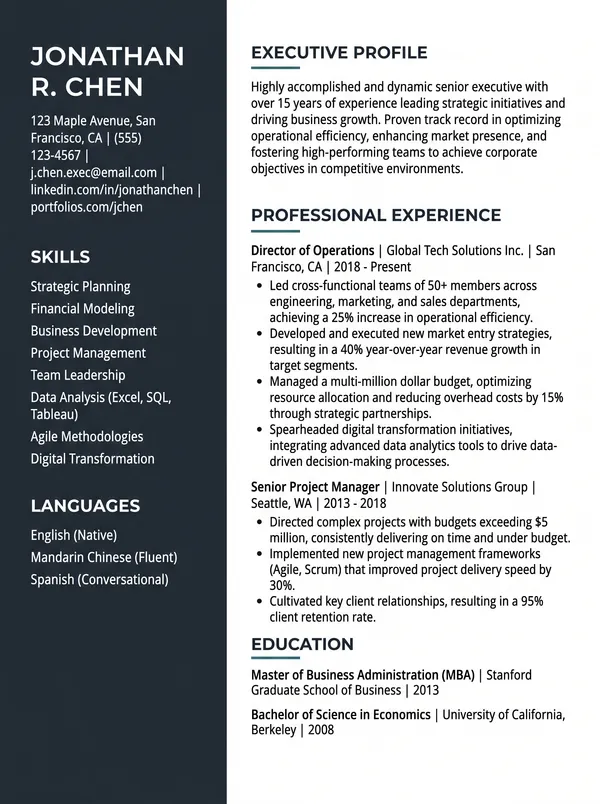
Who this suits
- Designers, art directors and creative roles, where the CV is itself a work sample.
- Senior and lead profiles with long tool and skill lists to place somewhere.
- Product, UX and front-end roles at companies that read CVs by hand.
- Anyone sending a CV as a direct attachment rather than through a portal.
What the design does
- Dark sidebar with reversed text, holding contact, skills and languages.
- Experience and education in the light column, in full reading width.
- Colour blocking that groups related information without needing headings for it.
- Consistent alignment across the split, so the two columns read as one page.
When to choose something else
Two columns are the layout ATS parsers most often get wrong, so do not use this for a large corporate or government portal — Minimal or Modern there. The dark block also uses a lot of ink if it will be printed.
Dark sidebar CV template — FAQ
Is this template free?
Yes. Every template is free with no watermark on the design itself. Free downloads add one small line at the bottom crediting Confileo; a subscription removes it.
Will it pass ATS screening?
Yes. All text is real selectable text, not an image, and the section headings use standard names (Experience, Education, Skills) that applicant tracking systems parse correctly.
Does it work in Arabic?
Yes. Choose Arabic as the document language and the whole layout flips to right-to-left with proper Arabic letter shaping — the text is not mirrored or broken.
Can I change it after downloading?
You can come back and edit any time — your draft is saved in your browser. To change the wording of an exported PDF, edit it here and download again rather than editing the PDF itself.