
 Logo Maker
  Business Cards
  Menu Maker
  Greeting Cards
  CV Maker
  Cover Letter Generator
  Invoices
  Certificates
  Letters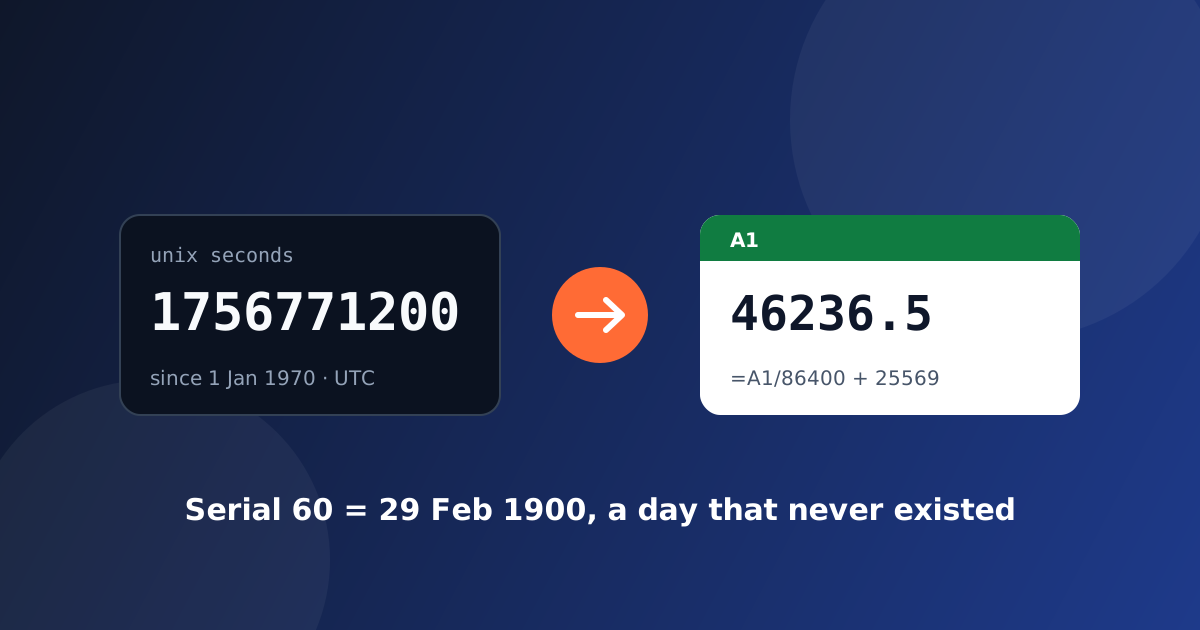
You paste 1756771200 into a spreadsheet and want to see a date. Or you export a sheet and your API receives a column of numbers like 46236.5 instead of dates. Both directions look trivial and both go wrong in the same three places: the epoch, the unit, and one fake day in February 1900.
What the two numbers actually count
A Unix timestamp is the number of seconds since 1 January 1970, 00:00 UTC. Leap seconds are ignored, so every day is exactly 86,400 seconds long. A timestamp from today has 10 digits. If you see 13 digits it is milliseconds (what Date.now() returns in JavaScript). 16 digits is microseconds, 19 digits is nanoseconds (Go, Rust and several databases use those).
An Excel serial date is the number of days since Excel's epoch, with the fraction of the day as the decimal part. 46236.5 is noon on the day with serial 46236. Excel never stores a time zone; the number is whatever you typed.
The formulas
Unix seconds to Excel serial, then format the cell as a date:
=A1/86400 + 25569
25569 is the serial of 1 January 1970. For milliseconds divide by 86400000 instead.
Excel serial to Unix seconds:
=(A1 - 25569) * 86400
Both formulas produce UTC. Excel does not know where you are, so a timestamp from a server will show the UTC hour. Add + 2/24 to shift to UTC+2, - 5/24 for UTC-5, and so on. If a whole column is off by exactly the same number of hours, that is the cause, not the formula.
In a German, Spanish or French copy of Excel the arithmetic is identical, but the function names and separators are not: DATE(1970,1,1) becomes DATUM(1970;1;1), FECHA(1970;1;1) or DATE(1970;1;1) with semicolons. The formula above avoids the function entirely, which is why it travels between language versions without editing.
Serial 60: the day that never happened
Excel's default 1900 date system says serial 1 is 1 January 1900 and serial 60 is 29 February 1900. That date does not exist. 1900 is divisible by 100 but not by 400, so it was not a leap year. The bug comes from Lotus 1-2-3, and Excel reproduced it in 1987 so that spreadsheets imported from Lotus would keep their dates. It has been kept ever since, on purpose, because fixing it would move every date in every old file by one day.
The consequences are small but real:
- Every serial below 61 is one day off against the real calendar.
DATE(1900,2,29)is accepted instead of raising an error.WEEKDAYreturns the wrong day for dates in January and February 1900.
This is also why libraries such as pandas use 30 December 1899 as "day zero" when they read Excel files: counting from there absorbs the phantom day, and every date from 1 March 1900 onward comes out right.
Google Sheets and LibreOffice count from 30 December 1899 without the fake leap day. Their serials agree with Excel from 1 March 1900 onward and differ by one before that. Older Mac versions of Excel used a 1904 date system (day zero is 1 January 1904). A workbook created there and opened elsewhere shows every date 1,462 days off, which is four years and one day. The fix is in File → Options → Advanced → "Use 1904 date system", not in the data.
The unit mistakes you will actually see
- A 13-digit value in a seconds converter produces a date thousands of years in the future. Count the digits before you convert.
- A 19-digit nanosecond stamp does not fit in a JavaScript number. Doubles hold integers exactly only up to 2^53, about 9.0 × 10^15, so the last digits get rounded. Treat it as a string and split off the last nine digits as the fraction of a second.
- 19 January 2038, 03:14:07 UTC is where a signed 32-bit seconds counter overflows. Anything still storing timestamps in an
int32will wrap to December 1901 at that moment. - Excel's own limit is serial 2,958,465, which is 31 December 9999. Anything above shows as
#####.
Doing it without a formula
If you have a column of timestamps rather than one value, the Unix timestamp converter takes the whole column at once. It detects seconds, milliseconds, microseconds and nanoseconds from the digit count, prints UTC and your local time on separate lines, gives the Excel serial and the ISO 8601 form for each row, flags serials below 61 because of the phantom day above, and writes the formula in the language of the Excel you use. Nothing is uploaded; the arithmetic runs in the browser.
Going the other way, if what you have is a date and you need the number, the same page converts an Excel serial or an ISO date back to a timestamp in any of the four units.